Posts

Disclosure of LAN Traffic

The disclosure of LAN traffic occurs when someone who is unauthorized reads, or otherwise obtains, information as it is moved through the LAN. LAN traffic can be compromised by listening and capturing traffic transmitted over the LAN transport media (tapping into a network cable, listening to traffic transmitted over the air, misusing a provided network connection by attaching an analysis device, etc.). Many users realize the importance of confidential information when it is stored on their workstations or servers; however, it is also important to maintain that confidentiality as the information travels through the LAN. Information that can be compromised in this way includes system and user names, passwords, electronic mail messages, application data, etc. For example, even though passwords may be in an encrypted form when stored on a system, they can be captured in plaintext as they are sent from a workstation or PC to a file server. Electronic mail message files, which ...
Manipulating Files in Delphi

Several common file operations are built into the runtime library. The routines for working with files operate at a high level. For most routines, you specify the name of the file and the routine makes the necessary calls to the operating system for you. In some cases, you use file handles instead. Although the Delphi language is not case sensitive, the Linux operating system is. Be attentive to case when working with files in cross-platform applications. Deleting a file Deleting a file erases the file from the disk and removes the entry from the disk's directory. There is no corresponding operation to restore a deleted file, so applications should generally allow users to confirm before deleting files. To delete a file, pass the name of the file to the DeleteFile function: DeleteFile(FileName); DeleteFile returns True if it deleted the file and False if it did not (for example, if the file did not exist or if it was read-only). DeleteFile erases the file named b...

Maya Interface - The Workspace

Image
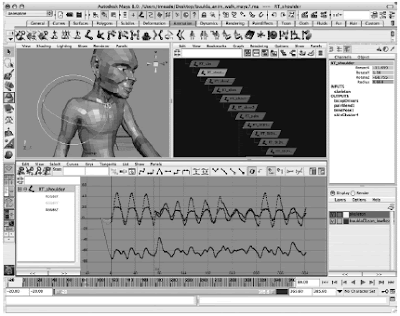
The Workspace is composed of one or more view panels used to access different parts of the user interface. By default, only one panel is displayed when you start up Maya . This is the Perspective view. Figure below shows the Maya UI with three panels loaded: the Perspective view, the Hypergraph, and the Graph Editor. The Channel Box appears on the right side of the UI. This type of window layout may suit the needs of an animator pretty well. In this example, the RT_shoulder object is selected. Its transform node is displayed in its hierarchy in the Hypergraph while the animation data for the object is displayed in the Graph Editor. With all of these panels available, an animator can select objects in the Perspective view window or the Hypergraph and use the Perspective view, Graph Editor, and Channel Box to analyze or make edits to the animation data. The Channel Box lets you view, edit, and keyframe all of the keyable attributes on any node of the object that is selecte...

Unauthorized Modification of Data and Software

Because LAN users share data and applications, changes to those resources must be controlled. Unauthorized modification of data or software occurs when unauthorized changes (additions, deletions or modifications) are made to a file or program. When undetected modifications to data are present for long periods of time, the modified data may be spread through the LAN, possibly corrupting databases, spreadsheet calculations, and other various application data. This can damage the integrity of most application information. When undetected software changes are made, all system software can become suspect, warranting a thorough review (and perhaps reinstallation) of all related software and applications. These unauthorized changes can be made in simple command programs (for example in PC batch files), in utility programs used on multi-user systems, in major application programs, or any other type of software. They can be made by unauthorized outsiders, as well as those who are ...

Working With Files in Delphi

BaseCLX supports several ways of working with files. The previous section, “Using streams,” states that you can use specialized streams to read from or write to files. In addition to using file streams, there are several runtime library routines for performing file I/O. In addition to input/output operations, you may want to manipulate files on disk. There are several approaches you can take when reading from and writing to files: The recommended approach for working with files is to use file streams. File streams are instances of the TFileStream class used to access information in disk files. File streams are a portable and high-level approach to file I/O. Because file streams make the file handle available, this approach can be combined with the next one. You can work with files using a handle-based approach. File handles are provided by the operating system when you create or open a file to work with its contents. The SysUtils unit defines a number of file-ha...

Maya Interface - The Toolbox

Image
The toolbox, shown in Figure below, contains shortcuts to the most commonly used tools for all workflows. The first three tools in the toolbox are the basic selection tools. You can select an object in the view window by clicking the Selection tool and then clicking the object in the view window. To select multiple objects, you can either hold down the SHIFT key while clicking objects in the view window or choose the Lasso tool in the toolbox and drag a selection around all of the objects that you want included in your selection. When selecting components (subobjects of a shape), you can use the Paint Selection tool. This not only is useful for selecting multiple components at time, but also keeps you from selecting components on the opposite side of the object you are selecting from. The next four tools in the toolbox are called transform tools—the Move, Rotate, Scale, and Universal Manipulator tools. Select an object in the view window and then choose the tool from the ...

Inappropriate Access to LAN Resources

One of the benefits of using a LAN is that many resources are readily available to many users, rather than each user having limited dedicated resources. These resources may include file stores, applications, printers, data, etc. However, not all resources need to be made available to each user. To prevent compromising the security of the resource (i.e. corrupting the resource, or lessening the availability of the resource), only those who require the use of the resource should be permitted to utilize that resource. Unauthorized access occurs when a user, legitimate or unauthorized, accesses a resource that the user is not permitted to use. Unauthorized access may occur simply because the access rights assigned to the resource are not assigned properly. However, unauthorized access may also occur because the access control mechanism or the privilege mechanism is not granular enough. In these cases, the only way to grant the user the needed access rights or privileges to pe...