Maya Interface - The Workspace
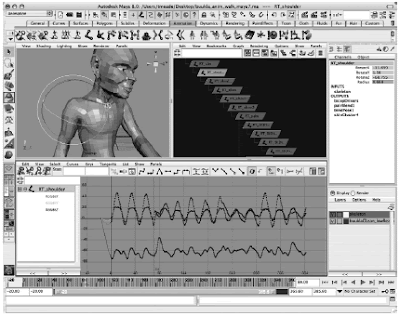
The Workspace is composed of one or more view panels used to access different parts of the user interface. By default, only one panel is displayed when you start up Maya . This is the Perspective view. Figure below shows the Maya UI with three panels loaded: the Perspective view, the Hypergraph, and the Graph Editor. The Channel Box appears on the right side of the UI. This type of window layout may suit the needs of an animator pretty well. In this example, the RT_shoulder object is selected. Its transform node is displayed in its hierarchy in the Hypergraph while the animation data for the object is displayed in the Graph Editor. With all of these panels available, an animator can select objects in the Perspective view window or the Hypergraph and use the Perspective view, Graph Editor, and Channel Box to analyze or make edits to the animation data. The Channel Box lets you view, edit, and keyframe all of the keyable attributes on any node of the object that is selecte...


